Airflow Yeedu Operator

Installation
To use the Yeedu Operator in your Airflow environment, install it using the following command:
pip3 install airflow-yeedu-operator
Overview
The YeeduOperator acts as a bridge within Airflow, allowing you to interact with both Yeedu jobs and notebooks. It handles:
- Submitting Jobs and Notebooks: Send jobs and notebooks to Yeedu from an Airflow task.
- Monitoring Progress: The operator polls the status of your submitted Yeedu jobs and notebooks.
- Handling Completion: Upon completion, the operator reports the outcome (success or failure) for both jobs and notebooks.
- Managing Logs: Logs associated with Yeedu jobs and notebooks are surfaced in the Airflow task log.
We support Apache Airflow 3.x only in the current airflow-yeedu-operator release. Apache Airflow 2.x is no longer supported.
Prerequisites
Before using the YeeduOperator, ensure you have the following:
- Access to the Yeedu API: You'll need valid credentials to interact with the Yeedu API.
- Creating Airflow Connection (For Yeedu Credentials):
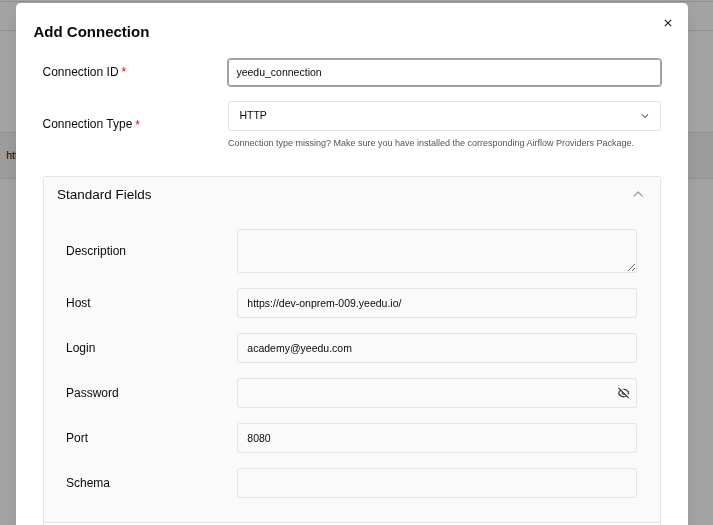
Steps to Create an Airflow Connection
-
Navigate to Connections:
- In the Airflow UI, click on the
Admintab at the top of the screen. - From the dropdown menu, select
Connections.
- In the Airflow UI, click on the
-
Create a New Connection:
- On the Connections page, click the
+(plus) button to add a new connection.
- On the Connections page, click the
-
Fill in the Connection Details:
- Conn Id: A unique identifier for your connection. Example:
my_yeeduu_connection. - Conn Type: Select the appropriate type for your connection. For a Yeedu Notebook or job,
HTTPis appropriate. - Login: The username for the connection.
- Password: The password for the connection.
- Conn Id: A unique identifier for your connection. Example:
-
Extra:
- Click on the
Extrafield to expand it. This field allows you to provide additional parameters in JSON format.
{
    "YEEDU_AIRFLOW_VERIFY_SSL": "true",
    "YEEDU_SSL_CERT_FILE": "/path/to/cert/file"
} - Click on the
The operator reads only the Login, Password and Extra fields from the connection. The Yeedu hostname and REST API port are taken from the job_url you pass to the operator, so there's no need to fill in the connection's Host field.
SSO Token (Azure AD SSO only)
If your Yeedu authentication type is Azure AD SSO, store the Yeedu login token in an Airflow Variable instead of using the connection password:
- In the Airflow UI, go to
Admin>Variables. - Click
+ Add Variable. - Set Key to a name of your choice (for example
yeedu_sso_token) and Value to your Yeedu login token.
Reference that variable from your task using the token_variable_name parameter.
DAG: Yeedu Job Execution
-
Setting Up the DAG
Import the necessary modules and instantiate the DAG with required arguments and schedule.
from datetime import datetime, timedelta
from airflow import DAG
from yeedu.operators.yeedu import YeeduOperator

# Define DAG arguments
default_args = {
    'owner': 'airflow',
    'depends_on_past': False,
    'start_date': datetime(2023, 1, 1),
    'retries': 1,
    'retry_delay': timedelta(minutes=5),
}

# Instantiate DAG
dag = DAG(
    'yeedu_job_execution',
    default_args=default_args,
    description='DAG to execute jobs using Yeedu API',
    schedule='@once',
    catchup=False,
) -
Creating Yeedu Operator Tasks
Create tasks using
YeeduOperatorto perform various Yeedu API operations.
    submit_job_task = YeeduOperator(
        task_id='demo_dag',
        job_url='https://hostname:{restapi_port}/tenant/tenant_id/workspace/workspace_id/spark/notebook/notebook_id', # Replace with job or notebook url
        connection_id='yeedu_connection', # Replace with your connection id
        dag=dag,
)cautionThe
job_urlmust include the Yeedu REST API port. Copy the job or notebook URL from the Yeedu UI and replace the port with yourrestapi_portvalue. Ajob_urlwithout a port fails when the operator parses it.
Operator Parameters
Required
| Parameter | Type | Description |
|---|---|---|
job_url | str | URL of the Yeedu job or notebook, including the REST API port. Encodes the tenant ID, workspace ID, run type and conf ID. |
connection_id | str | The Airflow connection ID holding the Yeedu username, password and SSL settings. |
Optional
| Parameter | Type | Description |
|---|---|---|
token_variable_name | str | Name of the Airflow Variable holding a Yeedu session token. Use this when Yeedu authentication is Azure AD SSO. |
arguments | str | Arguments passed to the job or notebook run. |
conf | List[str] | Spark/runtime configuration overrides, each item in key=value format. Must be a list. If the same key appears twice, the last value wins. |
cluster_ids | List[int] | Fallback cluster IDs to retry on after the run fails on its configured cluster. The job always runs once on its configured cluster first, then tries these in order. Duplicates are removed automatically. |
loop_input | str | Value pushed to XCom for downstream tasks. |
Example with optional parameters
submit_job_task = YeeduOperator(
    task_id='demo_dag',
    job_url='https://hostname:{restapi_port}/tenant/tenant_id/workspace/workspace_id/spark/job/job_id',
    connection_id='yeedu_connection',
    token_variable_name='yeedu_sso_token',
    arguments='--date 2024-01-01',
    conf=[
        'spark.driver.memory=4g',
        'spark.executor.memory=8g',
    ],
    cluster_ids=[10, 20, 30],
    dag=dag,
)
-
Execution
To execute this DAG:
- Ensure all required configurations (job_url, connection_id) are correctly provided in the task definition.
- Place the DAG file in the appropriate Airflow DAGs folder.
- Trigger the DAG manually or based on the defined schedule.
- Monitor the Airflow UI for task execution and logs.